
I have heard from some of you that you aren’t getting the entire Couponing for 4 Facebook feed. Well, a few weeks ago Facebook made a bunch of changes to the way that we are able to view things. For some reason, Facebook has determined that they would only feed the posts and sites to you that they think you read the most. I’m not sure how they determine this, but here’s how to fix it so that you can see your entire feed again:

First, go to the top of your Facebook page and click on “Most Recent”
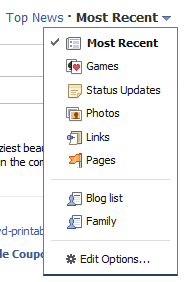
Click the arrow and select “Edit Options”

Then, change your preference to “All of your friends and pages” and save that page. All of a sudden, you’ll see a ton of posts from friends and pages that you’ve been missing. I hope this helps! And while you’re over there, make sure that you’re “Like” Couponing For 4!
(Thanks Rose Knows Coupons!)
 Alli is a Chicago based wife and mother of two children. She has turned money-saving into a game and enjoys searching out the best deals to help you save money! Alli shares her insight, tips and up-to-the-minute deals for local and national retailers and brands. Her hope is that you will play the game and learn to save money at the same time!